Landing page accessibility: what to check first. Room in the nest for everyone

Alex · Founder of Magpie AI
Published · 8 min read
In short
Fix what WebAIM finds on most home pages first: low contrast, images with no alt text, unlabelled fields, unnamed links and buttons. Then tab through the page with the keyboard.
Contents
One in six people has a significant disability, by the WHO's 2023 count. That's an estimated 1.3 billion people, and some of them reach your site with a screen reader, a keyboard and no mouse, or the browser's text made bigger.
Most sites trip them up somewhere. In February 2026 WebAIM ran its automated check over the home pages of the top million sites and found WCAG failures on 95.9% of them, with 56.1 errors on the average page. Both figures were worse than a year before, when they stood at 94.8% and 51.
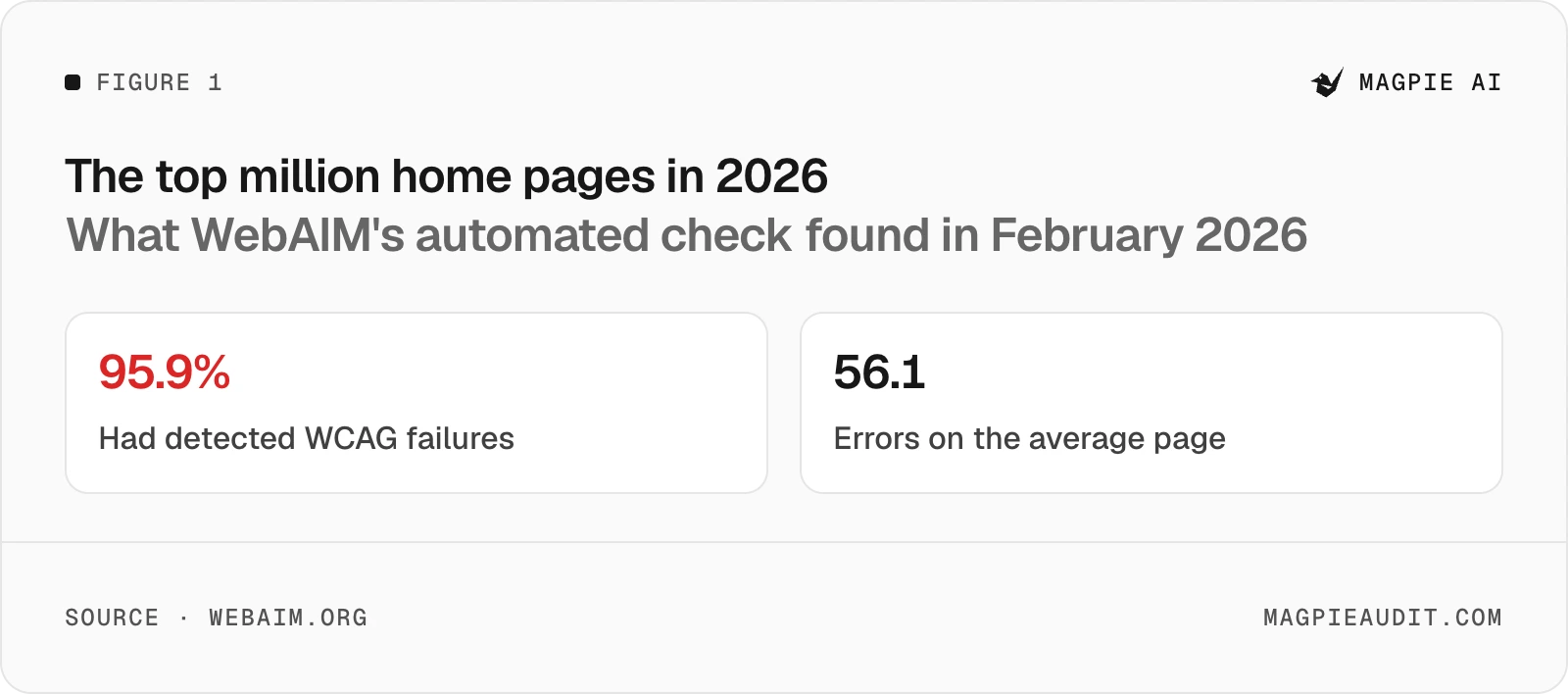
That sounds grim, but the errors aren't varied. WebAIM found 96% of them fall into six kinds, and on a landing page each one is a colour, an attribute or a few words.
The six faults on most home pages#
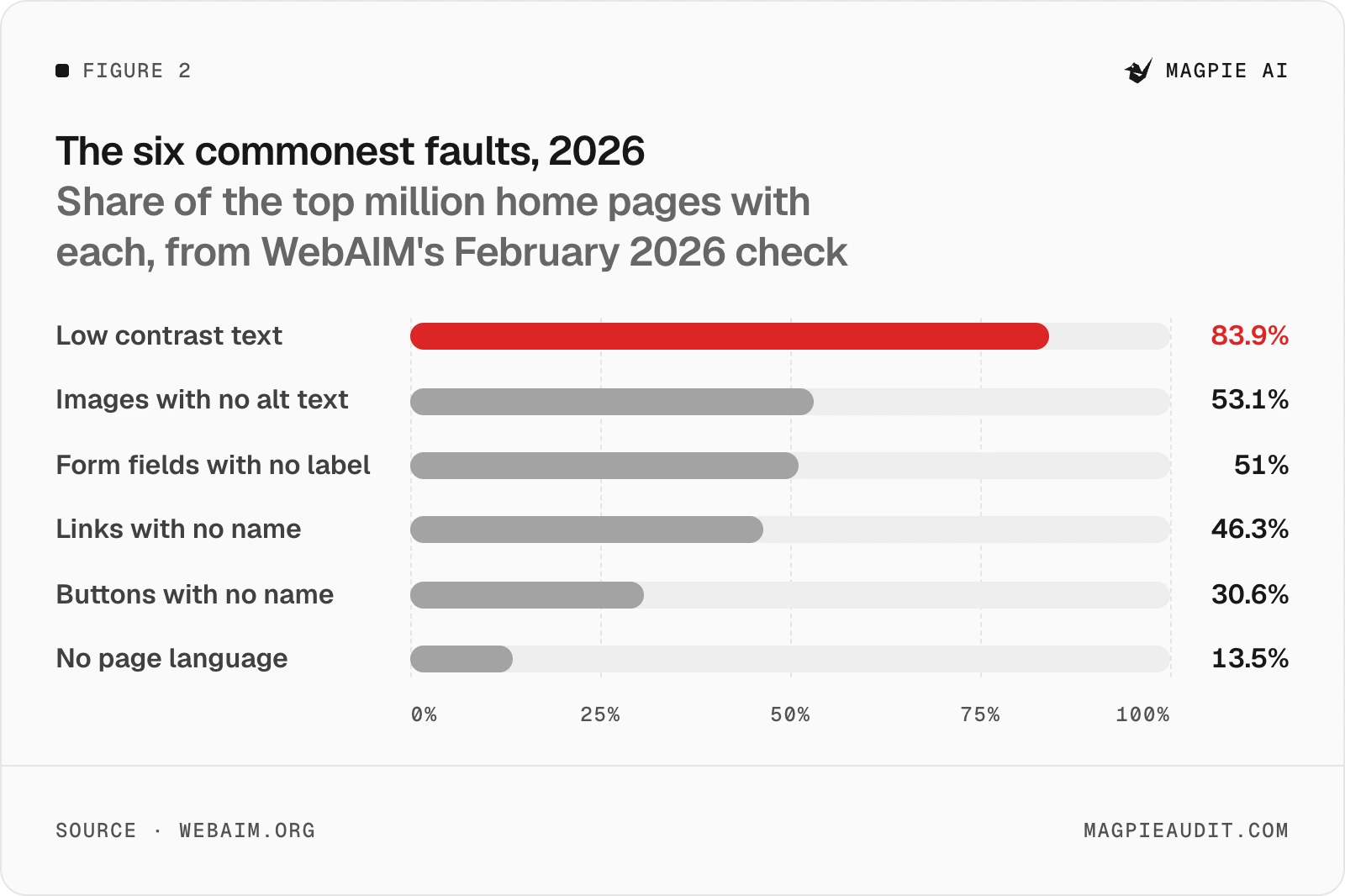
Low contrast text sits at the top of the pecking order, on 83.9% of the home pages WebAIM checked in 2026. The other five follow some way behind.
Low contrast text#
WCAG 2.2 asks for a contrast ratio of at least 4.5:1 between text and its background, or 3:1 for large text, which it sets at 18 point, or 14 point bold (about 24px and 18.5px). Logos are exempt. WebAIM counted 34 lines of low contrast text on the average home page.
On a landing page the usual suspects are the pale grey line under the headline, the placeholder in the email field and white words on a pastel button. I'd check those three first, as they're the words a visitor reads to decide, and they sit where visitors look first.
Images with no alt text#
Every picture that carries meaning needs words a screen reader can say instead (WCAG's 1.1.1). A screenshot of your dashboard wants a sentence on what it shows. A decorative swirl gets an empty alt="", so it's skipped. WebAIM found 16.2% of all home page images had no alt text at all, about 10.8 a page.
A tool can only tell you the text is missing. W3C's own Easy Checks say that to know whether it's right, "you need to see the image and judge it in context."
Form fields with no label#
51% of home pages had at least one, and a third (33.1%) of all the form fields WebAIM saw weren't properly labelled. On a landing page that's nearly always the email box in the hero, with "Enter your email" as its placeholder and nothing else.
WCAG's 3.3.2 asks for labels or instructions wherever you ask for input. A placeholder vanishes the moment someone starts typing, so give the field a real label tied to it in the code (a <label>, or an aria-label where there's no room to show one).
Links and buttons with no name#
These are the icons. The hamburger menu, the arrows on a carousel, the little X and LinkedIn marks in your footer. WCAG's 4.1.2 wants every control's name to be readable by software, and without one a screen reader announces "button" and stops there. That's 46.3% of home pages with an empty link and 30.6% with an empty button.
Take tidyrota.example, a made-up rota app. On a phone its pricing page is reached only through a menu icon, and the icon has no name, so someone using a screen reader hears "button" and has to guess. One aria-label="Open menu" fixes it. Buttons with words need the right words as well, which is a separate job.
No page language#
The quickest of the six. Put lang="en" (or your language) on the <html> tag, and screen readers "can load the correct pronunciation rules", in W3C's words. 13.5% of home pages still miss it, down from 17.1% in 2024.
What WCAG 2.2 AA asks of a landing page#
WCAG 2.2 became a W3C Recommendation on 5 October 2023. Its rules come in three levels, A, AA and AAA, and meeting AA means meeting every rule at A and AA.
Most of 2.2 is 2.1 unchanged. It added nine rules, six of them at A or AA, and three of those touch almost every landing page:
- Target size (2.5.8, AA): anything you tap or click is at least 24 by 24 CSS pixels, or spaced so it doesn't crowd its neighbours. Footer links and close buttons are where this slips.
- Focus not hidden (2.4.11, AA): when someone tabs to a button, it isn't wholly covered by something you added. A sticky header, a chat bubble or a cookie banner is the usual cover.
- Accessible login (3.3.8, AA): no login step that rests on remembering a password or solving a puzzle, unless the page also offers another way through it or something that helps with it.
Keyboard focus you can see (2.4.7) has been AA since before 2.2, and it's the one I'd test by hand, because you'll find it in seconds.
How to check your own site#
Run an automated check, then put the mouse away. WebAIM's Million is made with its own free WAVE tool, and any checker of that kind will find the six faults above. Magpie's free report has a "Works for everyone" check that lists what it finds on your site, worst first, with where each one sits.
Then do what no automated check can. W3C's Easy Checks put it plainly: "Click in the address bar, then put your mouse aside and do not use it." Press Tab through the whole page. You should reach every link, field and button, in an order that makes sense, and you should always see where you are. Zoom the text up and see whether anything overlaps or disappears. Read each image's alt text beside the image.
W3C is honest about the limits of all this, its own checks included. They "cover just a few accessibility issues", and "a web page could seem to pass these checks, yet still have significant accessibility barriers." WebAIM says the same of its tool: "Absence of detected errors does not indicate that a page is accessible or conformant." A clean result is a good start, never proof.
Does the European Accessibility Act apply to a small SaaS?#
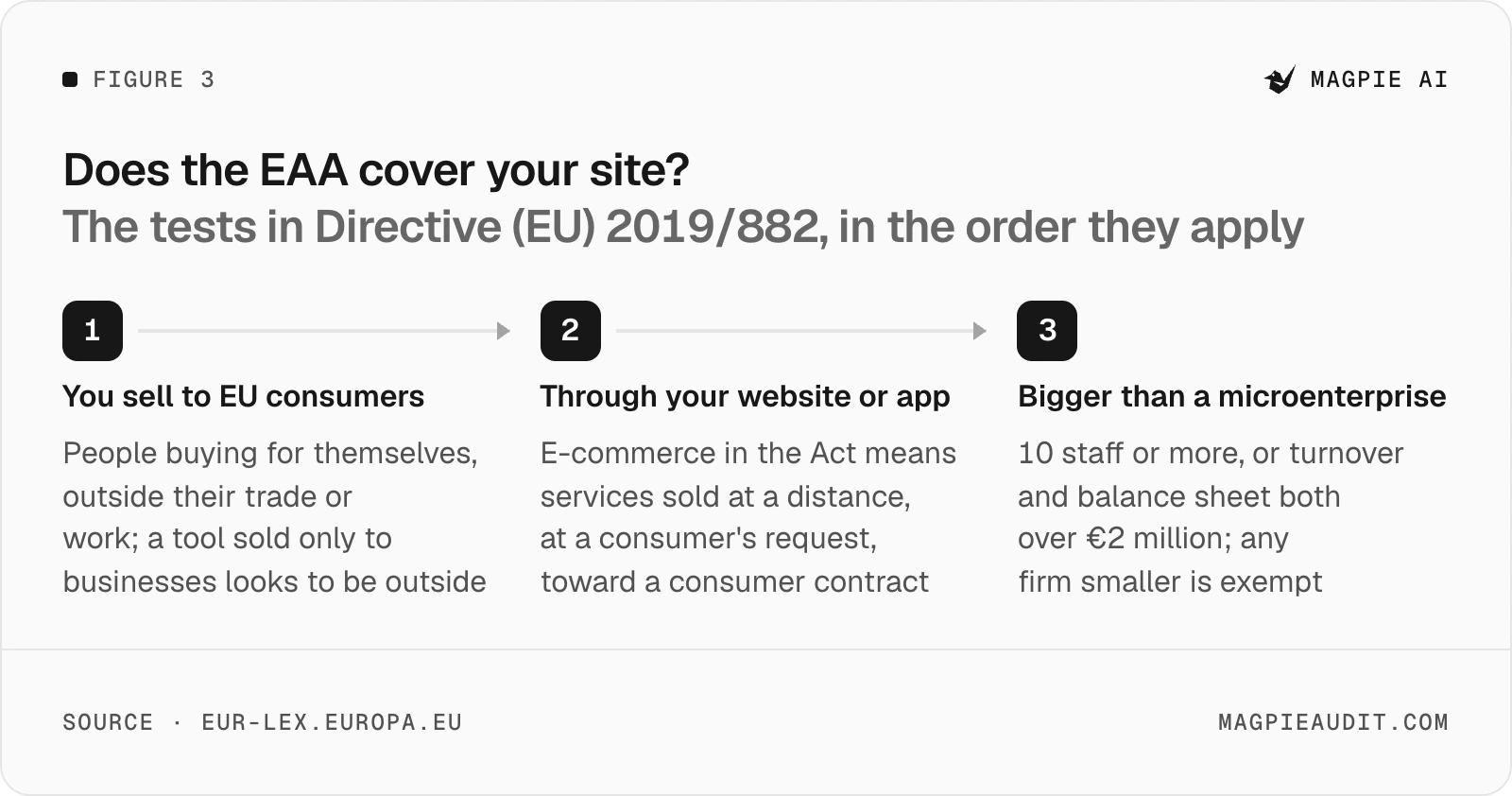
Only if you sell to consumers in the EU and you're bigger than a microenterprise. The Act, Directive (EU) 2019/882, has applied since 28 June 2025 to a list of services "provided to consumers", e-commerce among them. It defines e-commerce as services sold at a distance through websites and apps, at a consumer's request, with a view to a consumer contract.
A consumer, in the Act, is someone buying for purposes outside their trade, business, craft or profession. So, as I read the text, a tool sold only to businesses sits outside it. Plenty of SaaS sells to both, though, and a solo plan bought on a personal card may well be a consumer contract.
Then there's size. Article 4(5) says "Microenterprises providing services shall be exempt", and the Act defines a microenterprise as one with fewer than 10 staff and an annual turnover or balance sheet of no more than €2 million. Most indie products are well inside that.
For a service that's covered, the Act's annex asks for a website that's accessible "in a consistent and adequate way", on the same four principles WCAG is built on. Contracts agreed before 28 June 2025 can run on unchanged until they end.
I'm not a lawyer, and this isn't legal advice. Each EU country wrote the Act into its own law, so the detail and the penalties differ by country, and if you're close to either line it's worth a proper answer before you rely on the exemption. I'd fix the six faults either way. Most are a colour or an attribute, and the people they shut out might otherwise have read your pricing.
What about the ADA in the US?#
There's no web rule for businesses, though the Department of Justice says the ADA reaches their websites. Its guidance of March 2022 says Title III "prohibits discrimination against people with disabilities by businesses open to the public", that this covers what they offer online, and that businesses "have flexibility in how they comply". It names WCAG as helpful guidance, not as a requirement.
The one rule that does set a standard, WCAG 2.1 AA, applies to state and local governments and the firms they contract. In April 2026 the Department pushed its deadlines back to 26 April 2027 and 26 April 2028, by population.
That's as far as the Department's own pages go, and I won't go further than them. Whether a small SaaS with no shop counts as a business open to the public is a question for a US lawyer. Meeting WCAG 2.2 AA puts your ducks in a row for both sides of the Atlantic, whichever way it's answered.
Questions people ask#
Will an accessibility plug-in fix it for me?#
Not on its own word. In April 2025 the US Federal Trade Commission ordered one plug-in's maker to pay $1 million after it claimed the plug-in "can make any website compliant" with WCAG, and barred it from saying so again without evidence. Fixing the page itself is what changes what a screen reader hears.
Which should I fix first?#
I'd go by who's stopped rather than by count. An unnamed menu button or an unlabelled email field can stop someone signing up at all, while a slightly pale caption only slows them down. So the main button, the sign-up field and the way to your pricing come first, then contrast across the rest of the page, then the alt text on pictures further down.
Sources
- WebAIM, The WebAIM Million: the 2026 report on the accessibility of the top 1,000,000 home pages (opens in a new tab)
- World Health Organization, Disability and health (fact sheet, 7 March 2023) (opens in a new tab)
- W3C, WCAG 2.2 Understanding: Contrast (Minimum) (opens in a new tab)
- W3C, WCAG 2.2 Understanding: Language of Page (opens in a new tab)
- W3C, How to Meet WCAG 2.2 (Quick Reference) (opens in a new tab)
- W3C, What's New in WCAG 2.2 (opens in a new tab)
- W3C, Easy Checks: a first review of web accessibility (opens in a new tab)
- Directive (EU) 2019/882, the European Accessibility Act (opens in a new tab)
- European Commission, European Accessibility Act (opens in a new tab)
- US Department of Justice, Guidance on Web Accessibility and the ADA (18 March 2022) (opens in a new tab)
- US Department of Justice, Fact sheet: new rule on the accessibility of web content and mobile apps (opens in a new tab)
- US Federal Trade Commission, FTC approves final order requiring accessiBe to pay $1 million (22 April 2025) (opens in a new tab)
About the author
Alex · Founder of Magpie AI
Alex founded Magpie AI and writes about turning a site's visitors into customers