If your domain or SSL certificate expires. Don't be a sitting duck

Alex · Founder of Magpie AI
Published · 6 min read
In short
An expired certificate puts a browser warning in front of your whole site. An expired domain can go dark the day it lapses and, once deleted, leaves 30 days to buy it back. Automate both.
Contents
Let's Encrypt stopped emailing people about expiring certificates on 4 June 2025. It had said so in January and pointed people to a monitoring service instead. Anyone still counting on those emails simply stopped getting them, with nothing to say the next one wasn't coming.
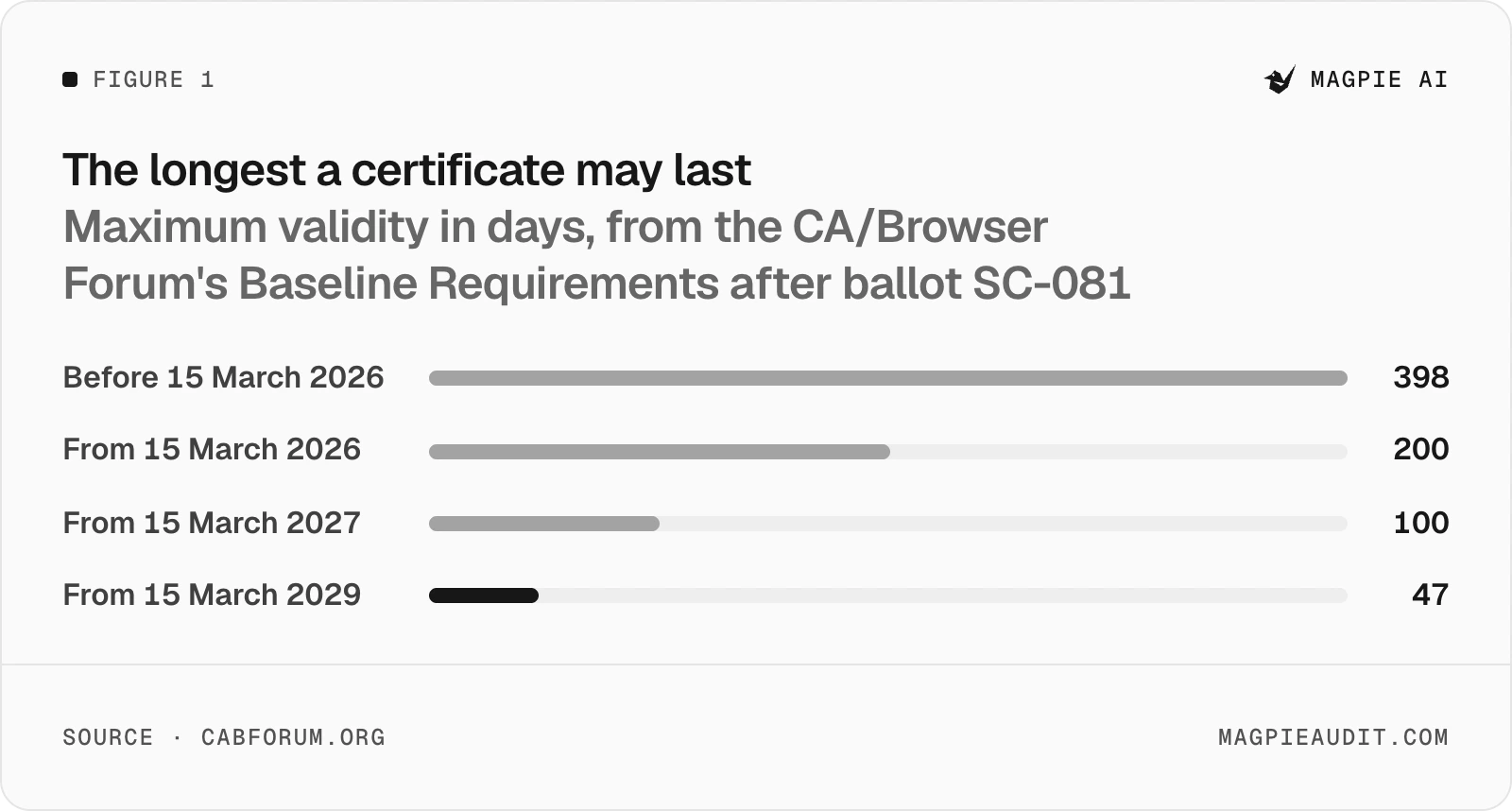
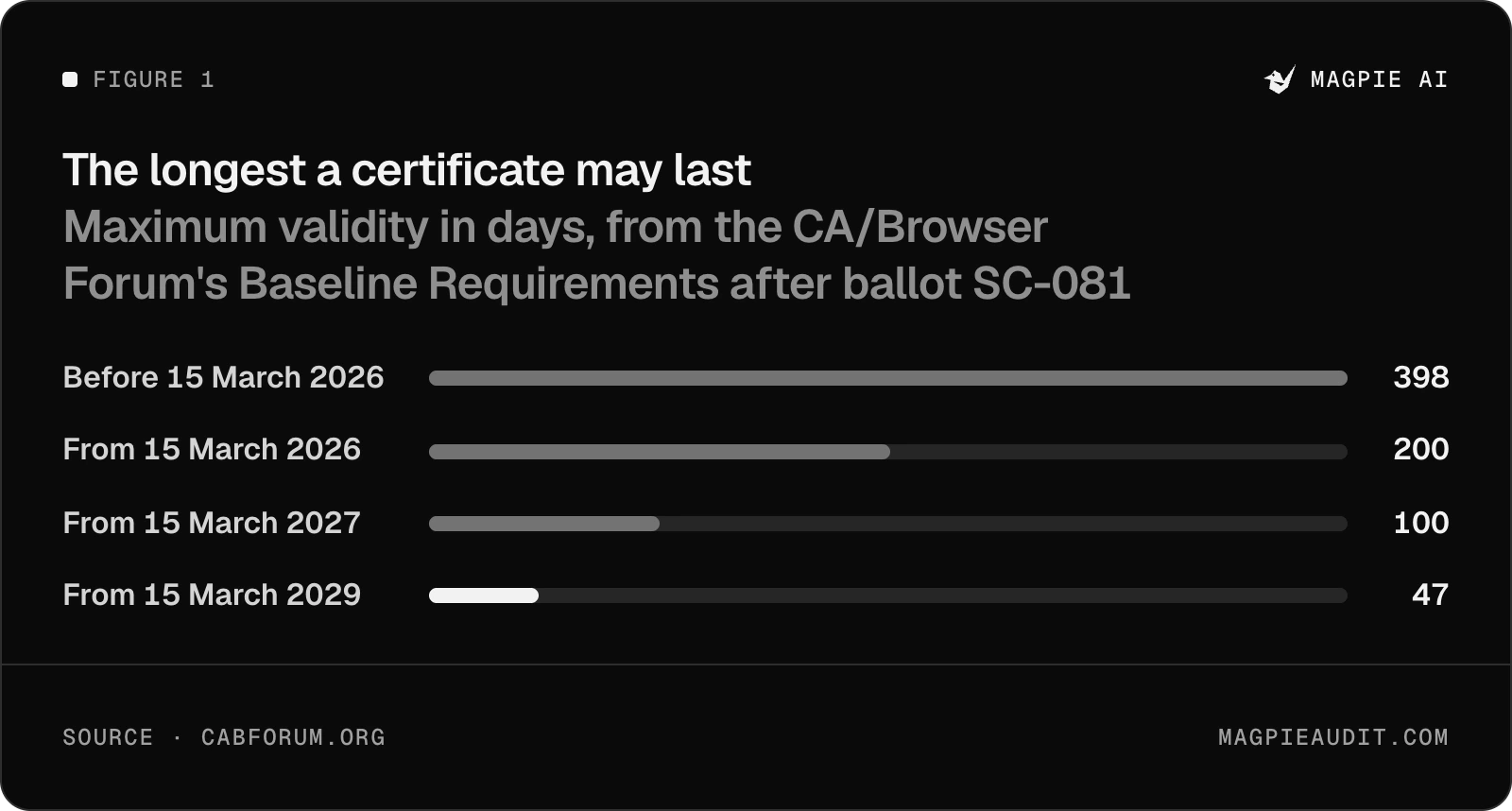
Certificates are getting shorter, too. The industry has agreed to cut the longest one may last from 398 days to 47 by 2029, so a renewal that came round once a year will come round about eight times. A domain renews far less often, and it tends to lapse for duller reasons, like a card that ran out, a reminder sent to an old address or a cofounder who left with the login.
A lapsed certificate and a lapsed domain both take your site away from visitors, by different routes and on different clocks.
What visitors see when your certificate expires#
A full-page warning, before a single word of your site loads. In Chrome it's headed "Your connection is not private", and the page underneath is never drawn. Your headline, your first screen and your button may as well not exist.
Here's the bit that stings. Chrome's own help page lists the date error, NET::ERR_CERT_DATE_INVALID, under clock problems and tells the visitor to "make sure the time and date are correct" on their device. Only after that does it say "contact the website owner". So a visitor is sent off to check their own clock first, and nothing on the page tells them it's your fault.
Nor is there any warm-up. The warning appears on the second the certificate runs out, for every visitor at once.
Why certificates now expire so much sooner#
The browsers and the certificate issuers voted for it. The CA/Browser Forum, where they set the rules together, passed ballot SC-081 in April 2025, with 25 issuers for it and none against. It steps the longest lifetime down over four years.
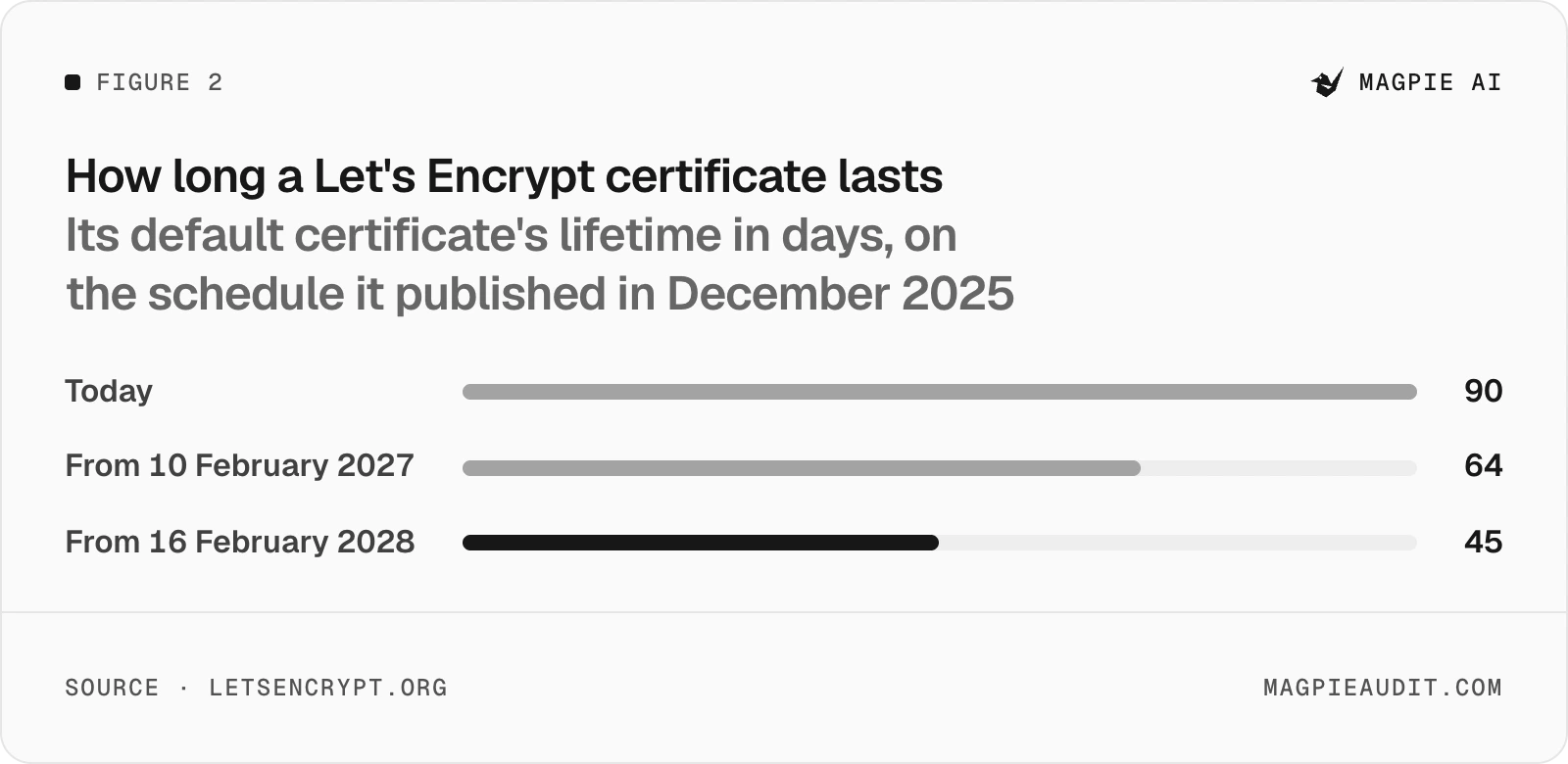
If your host gets its certificates from Let's Encrypt, as many do without saying so, you're already well inside those limits. Its default certificate lasts 90 days. From 10 February 2027 its default drops to 64 days, and from 16 February 2028 to 45.
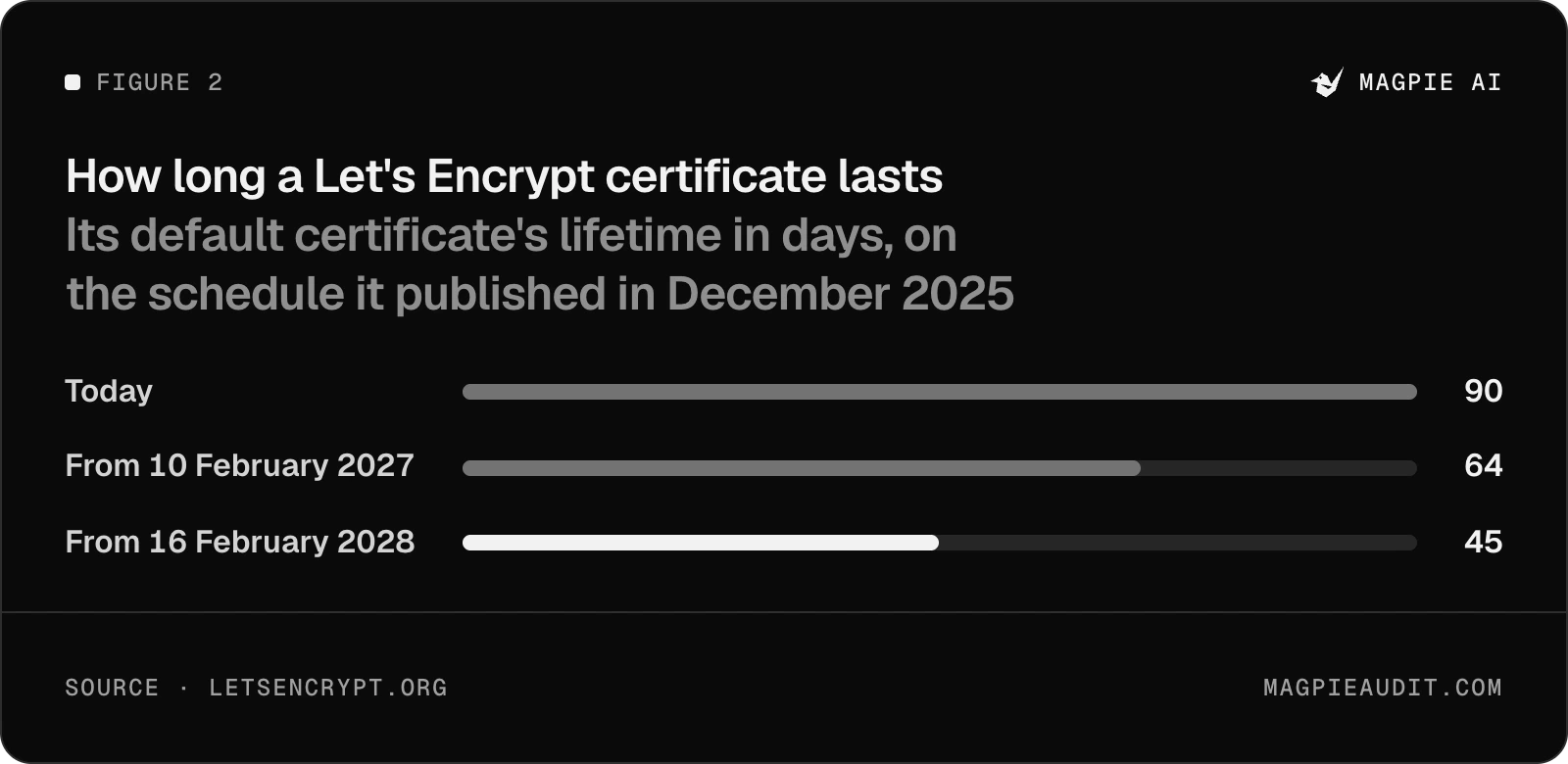
That changes how renewal has to work. Let's Encrypt says "renewing at a hardcoded interval of 60 days will no longer be sufficient", and asks clients to renew about two thirds of the way through a certificate's life, ideally by asking its servers when to (a feature called ACME Renewal Information). So the cron job someone wrote in 2022, the one that renews every 60 days and that nobody has opened since, will start missing.
Let's Encrypt's reason is security, as a shorter life limits "the scope of compromise" when something goes wrong. It's hard on anything done by hand, though. The early bird who set up renewal once and forgot about it is pretty much the person most at risk.
What happens when your domain expires#
Slowly, in stages, with more chances to save it than most people expect. ICANN's Expired Registration Recovery Policy sets the steps for generic domains like .com, .app and .dev, and every accredited registrar has had to follow its current wording since August 2025.
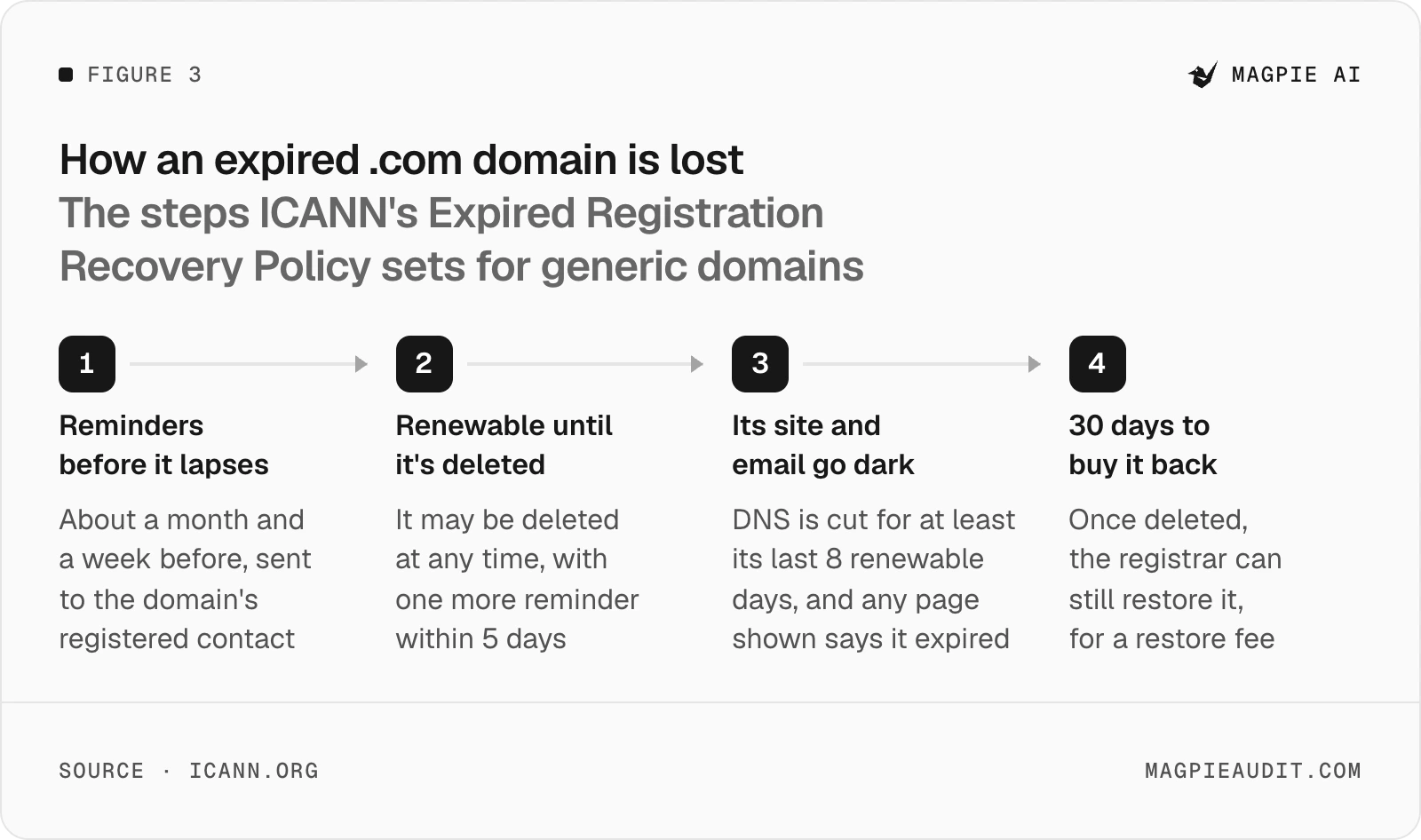
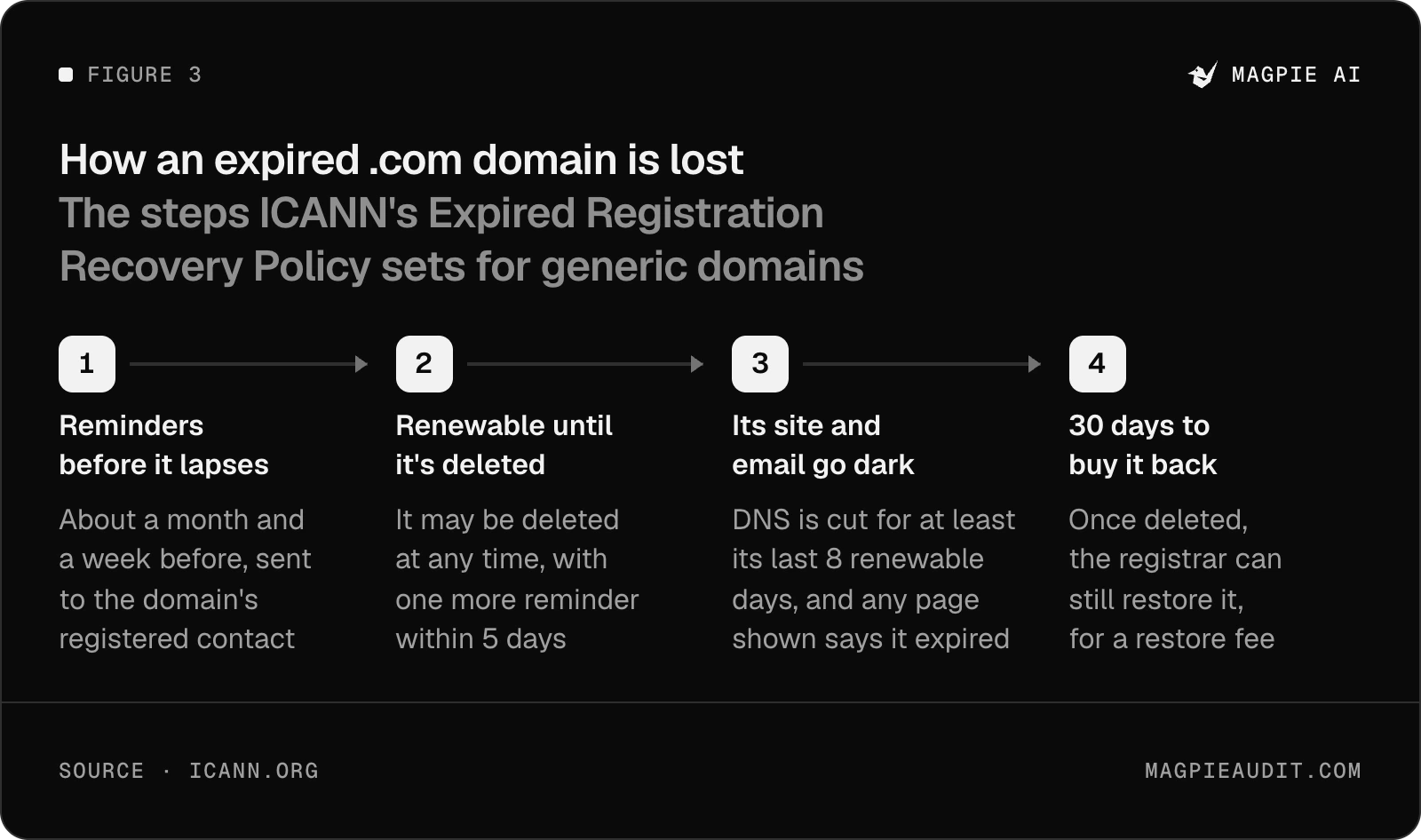
The step that catches people out is the third. While the domain waits to be renewed, ICANN's policy has the registrar cut its DNS for at least the last 8 days it can be renewed (from the moment it expires, if it's deleted sooner), so your site and often your email stop with it. Registrars can also delete a domain "at any time after they expire", which starts the 30-day redemption period, and getting it back then means paying a restore fee. After that, ICANN says, it may go to whoever registers it first.
Those reminders all go to the domain's registered contact. If the domain was bought on a personal email by someone who's since flown the nest, the warnings land in an inbox nobody reads.
ICANN's policy covers generic domains alone. A country-code domain such as .uk, .io or .de follows its own registry's rules, so read your registry's if that's what you have. If yours has already lapsed, ICANN says "you should immediately contact the registrar", and I wouldn't wait a day.
How to make sure neither ever lapses#
Automate both renewals. Then watch the dates anyway, because a renewal that fails usually fails without telling anyone.
For the domain:
- Turn on auto-renew at your registrar, paying for several years where it's offered.
- Check the card it renews with, and update it on the day a new card arrives in the post.
- Put the contact email on an address you'll keep, a shared one rather than one person's.
For the certificate, let your host or your server's ACME client renew it, and check it actually does. Look at the certificate's expiry date today, then again a few days after it should have renewed. If the date hasn't moved, something's broken. If you renew on a fixed timer, move to one that renews by the fraction of the lifetime left before Let's Encrypt's 64-day default arrives in February 2027.
Then keep an eye on both dates from outside, as a visitor would see them. A certificate can renew on your server and still not be the one being served, behind a load balancer or a CDN that kept the old one. Magpie's Monitor tab shows the days left on each site's certificate and domain and emails its owners well before either runs out, alongside the uptime check that tells you when the site is down for any other reason.
Questions people ask#
How do I see when my certificate expires?#
In Chrome, click the icon to the left of the address, open the connection details and then the certificate, and its expiry date is listed there. Do it on your live address and on the www version too, as they can be served different certificates.
How much does it cost to get a deleted domain back?#
It depends on the registrar, and I'd rather not guess a figure. ICANN's policy only requires registrars to make their "redemption/restore fees reasonably available" to you, so look it up now, before you need it. The cheaper fix is to renew before the registrar deletes it, which the policy lets it do at any time after expiry.
Will an expired certificate hurt my Google ranking?#
I haven't found Google say what it does with a site behind a certificate warning, so I won't claim either way. Fair enough to wonder, but the visitors turned away by the warning are the cost you can be sure of.
8 sources
- ICANN, Expired Registration Recovery Policy (updated 21 February 2024) (opens in a new tab)
- ICANN, About Renewing an Expired Domain (opens in a new tab)
- CA/Browser Forum, Ballot SC081v3: Introduce Schedule of Reducing Validity and Data Reuse Periods (2025) (opens in a new tab)
- CA/Browser Forum, Baseline Requirements (version 2.3.1, October 2026) (opens in a new tab)
- Let's Encrypt, Ending Support for Expiration Notification Emails (Josh Aas, 22 January 2025) (opens in a new tab)
- Let's Encrypt, Decreasing Certificate Lifetimes to 45 Days (Matthew McPherrin, 2 December 2025) (opens in a new tab)
- Let's Encrypt, FAQ (opens in a new tab)
- Google Chrome Help, Get help with common error messages in Chrome (opens in a new tab)
About the author
Alex · Founder of Magpie AI
Alex founded Magpie AI and writes about turning a site's visitors into customers